Spark DataFrame is a great way to do data analytics over big data, and it has many similar (not slightly different) APIs like the well-adopted python package: Pandas. Recently, I have been working with both of them quite frequently and I found it is very easy to misuse one with another.
Here are several great posts about the comparison between Pandas and Spark DF:
@chris_bour/6-differences-between-pandas-and-spark-dataframes
from-pandas-to-apache-sparks-dataframe
pandarize-spark-dataframes
Wednesday, March 2, 2016
Sunday, February 28, 2016
Elasticsearch with Python: document APIs
What is a document in ES: "In Elasticsearch, the term document has a specific meaning.
It refers to the top-level, or root object that is serialized into JSON and
stored in Elasticsearch under a unique ID."
If comparing ES with traditional SQL server, a document to ES is more like a row to SQL. It usually represent one object stored in ES's index.
There are quite a few handy commands in elasticsearch-py to do following operations:
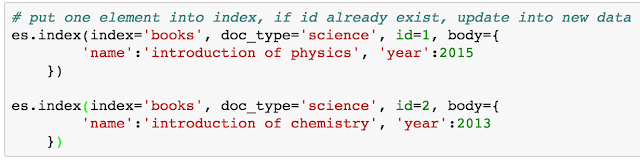
or one can specify the op_type as "create", with the only difference that if the "id" already exist in the index, the operation with "create" will return error, while the operation with default ("index") will simply update the document.




If comparing ES with traditional SQL server, a document to ES is more like a row to SQL. It usually represent one object stored in ES's index.
There are quite a few handy commands in elasticsearch-py to do following operations:
Insert/update single document into an index

or one can specify the op_type as "create", with the only difference that if the "id" already exist in the index, the operation with "create" will return error, while the operation with default ("index") will simply update the document.

Delete single document from an index

Insert/update/delete multiple document(s) into an index
This is more involving than a single document operation. This require to load the "helpers" module, and pass the "es" and a list of "actions" into the "helpers" object.

Then we may want to access to different documents. Accessing different documents is not exactly same as doing a search, because one need to know its index, type and id. So it would be nice to put it here before going deep into search.
Access documents from an index


Elasticsearch with Python: introduction
Elasticsearch (ES) is a search server based on Lucene.
Currently it has been widely used in different products to provide near
real-time search capacity. As a Python user focusing on analytics, having ES
integrated with existing Python experience would be mostly helpful &
convenient. Recently, I found the following two official ES client quite
useful:
Preparation
Step 2: install python analytics packages (iPython Notebook,
pip install elasticsearch-py and elasticsearch-dsl), then open the iPython
Notebook (or called Jupyter notebook now)
Step 3: set up the connection between the iPython notebook
with your local server.
from elasticsearch import Elasticsearch
es = Elasticsearch('localhost:9200')
That's it! Now the "es" variable refers to the
elastic search instance you just initiated.
Explore ES Client
Step 1.: install ES on local machine to start the game.
(version: 1.7.5) After download the package, unzip it, and then run
"./bin/elasticsearch", a new ES server will be started. By default,
the url to access is "localhost:9200"
The mostly used one (beside es itself) is the es.indices,
since it includes all operations about the index.

Index Operation
The index operation includes: create, display, and delete.
Those operations are shown below:

Sunday, June 8, 2014
Python: "in" for List v.s. Set
Both list and set are two basic data structures in Python, and they are widely used. Both data structures support the "in" statement, so either ' a in one_list: ' or ' a in one_set' is legit. However, the simulation speed differs dramatically and I will illustrate this finding with one example.


This example is a very simple options which use "not in" multiple times, from 1000, to 10000, to 100000, which mimic the 10 fold increase over N. The simulation time, for using list structure, requires almost N^2 times, while for set structure, requires almost N times.
This suggest the "not in" operation in set is much more advantageous than the list.
Saturday, April 26, 2014
Python Style Guide: PEP8
According to my colleague, the Python style guide, PEP8, is considered as the "bible" for python programmer. Everyone should conform according to its styles. The best resource can be found in this link. Here I summarize what I think is the most important ones:
Do not use tab, only use space for indentation.
Limit all lines to a maximum of 79 characters.
Separate top-level function and class definitions with two blank lines, otherwise, use one blank line between class method or block code within function.
Try not to "from a import *", "import one-class" in each line
My colleague suggest to use documentation string: """ comments """ for each functions/classes defined, this may help automatically generate documentation.
Block comments generally apply to some (or all) code that follows them, and are indented to the same level as that code.
Use inline comments sparingly.
1. Code Layout
Use 4 spaces per indentation level.Do not use tab, only use space for indentation.
Limit all lines to a maximum of 79 characters.
Separate top-level function and class definitions with two blank lines, otherwise, use one blank line between class method or block code within function.
Try not to "from a import *", "import one-class" in each line
2. Comment
Principle: "Comments that contradict the code are worse than no comments."My colleague suggest to use documentation string: """ comments """ for each functions/classes defined, this may help automatically generate documentation.
Block comments generally apply to some (or all) code that follows them, and are indented to the same level as that code.
Use inline comments sparingly.
3. Naming Convention
Modules should have short, all-lowercase names. (May have underscores if improves readability) --- ex. calculate_integral.py
Class names should normally use the CapWords convention. --- ex. class KeyDataStructure (object):
Function names should be lowercase (May have underscores if improves readability) --- ex. def calc_two_integral():
Method follows the same naming convention as function. While for non-public methods and instance variables, add "_" before the name
Constant defined under module level, use all capital with underscores. --- ex. MAX_ITER
4. Programming Recommendations
Code should be written in a way that does not disadvantage other implementations of Python. --- ex. do not use a += b for string operation, use ''.join()
Comparisons to singletons like None should always be done with is or is not, never the equality operators.
Always use a def statement instead of an assignment statement that binds a lambda expression directly to a name.
Use string methods instead of the string module.
Use ''.startswith() and ''.endswith() instead of string slicing to check for prefixes or suffixes.
Object type comparisons should always use isinstance() instead of comparing types directly.
For sequences, (strings, lists, tuples), use the fact that empty sequences are false.
Don't compare boolean values to True or False using ==.
There is really no need to rigidly memorize all of these. Just keep them in mind, and the code would be much better.
Wednesday, April 16, 2014
Python anti-pattern analysis
 |
| Range for iteration (1) |
Python has a lot of internal optimization for operations for speed and readability. I have been advised that there is a "python anti-pattern" website, which greatly help to prevent me from using python "inappropriately". Here I did a little bit analysis over why these patterns are important in terms of speed.
1. Use range for iteration
It is usually not necessary to use range(len(lista)) as a way to generate iteration over the list for indexing the list itself. Here is an example to show what is the difference.
 |
| Range for iteration (2) |
 |
| Range for iteration (3) |
The "anti-pattern" also suggest to use "zip" function, if there is a need to loop for two list, rather than using range(len()) statement. The test does not show an increase of speed, however, this "anti-pattern" rule may be made to read the code more readable.
2. Sentinel value in python
Usually, coming from a "C" background, I prefer to do a "check" for every condition statement: check whether a list has any element? using len(list); check if a variable is None, use "if a is None". However, this could be unnecessary in Python, as it has a rich sentinel value for the conditional variables. The following example shows how does the sentinel value improve the efficiency.

3. List comprehension
There are so many rich intrinsic data structures in Python which has been optimized over and over ... it is better to save some looping time and directly utilize them. List comprehension is one of the most commonly used one. The example shown below indicates what is the speed gain.

In general, there so many advanced skills ( or "tricks") to be used in Python. This is a powerful language, and I am excited to explore more along the way.
Subscribe to:
Posts (Atom)